
Build a set
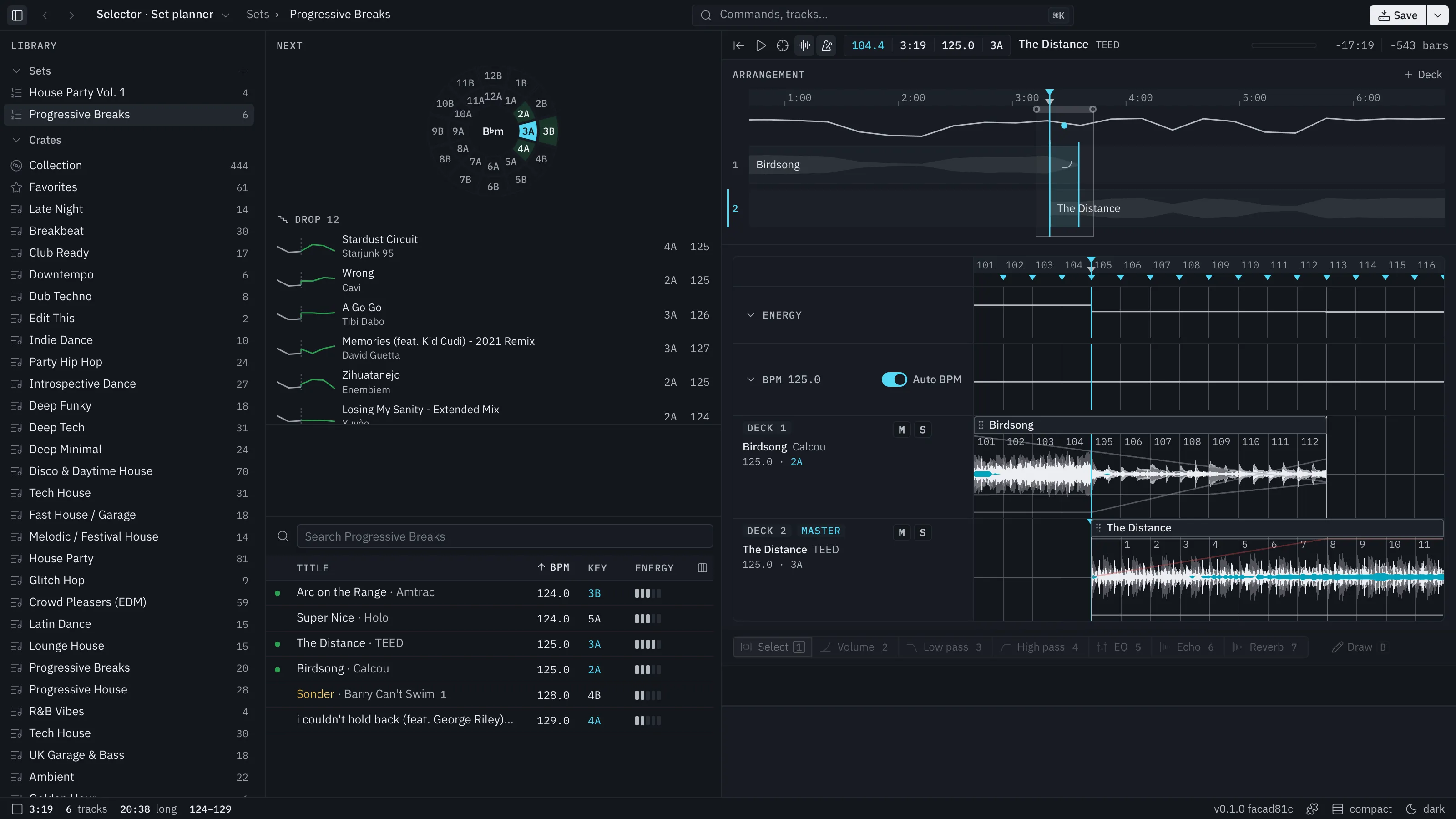
The set planner (⌥2) arranges tracks on decks and plans how they mix. It has three columns: your crates at the left, then Next above the library, then the arrangement and the detail.
Make a set
Section titled “Make a set”Press + on the Sets header in the left dock, or use ⌘K (New set) or ⇧⌘N. (In Crates, ⇧⌘N makes a folder.) A new set opens with its name ready to type in the title bar. Click the name, press F2 or choose Rename to change it later.
An empty set is a dotted slot. Drag a track into it; there is nothing to set up first.
Delete a set from its ⋯ menu, its right-click menu or the Save menu. Nothing asks: a toast offers Undo and ⌘Z brings the whole set back.
The arrangement uses decks, numbered 1 to 4 as on a CDJ setup. You start with two and can add a third and fourth (⇧D). Remove the last one with ⌥⇧D while nothing plays on it.
A track stays on one deck. To place a track:
- Drag a track from the library or Next onto a deck, in the detail or the arrangement. It plays on that deck from the bar under the pointer. A track already playing there stops where the new one starts, and the landing shows what it cuts.
- Double-click a track in the library or Next (or press ↵). It goes after the selected track, from where that track stops, on a deck with nothing playing there.
- Drop audio files from the Finder.
Move a track by dragging its block in the arrangement, or its first clip’s header, to another deck or bar. Nothing else moves. Tracks after it follow the music, so time you loop in or cut ahead of a track moves it and every track after it.
The Next column suggests what comes after the master track. A track fits when its key mixes (Camelot wheel) and its BPM is within 3 of the current track. Candidates are sorted by the energy move they make: Drop, Hold, Lift or Peak, each with a count. Each shows the handoff it would make: the current track’s tail joined to the candidate’s head.
Click a candidate to load it on the audition deck. Double-click or press ↵ to place it after the current track. Drag it onto a deck.
Narrow the candidates by selecting a crate or playlist in the dock.
The audition deck
Section titled “The audition deck”Between Next and the library, a small deck plays the library row you last selected. Hover a row or a Next candidate and press Space to hear it. If you last picked the deck, Space plays the deck; once you pick something in the set, it plays the set. The set’s own Play always plays the set.
Master track
Section titled “Master track”Next, the key wheel, the title bar and every key colour follow one master track: the track playing at the playhead, else the track you picked, else the one at the marker. The deck’s card marks it Master.
Energy
Section titled “Energy”An Energy lane shows the energy of the phrase each playing track is in. It is a readout, not something you edit. Energy and BPM lanes fold to a strip with a chevron on their card.