
Curves and effects
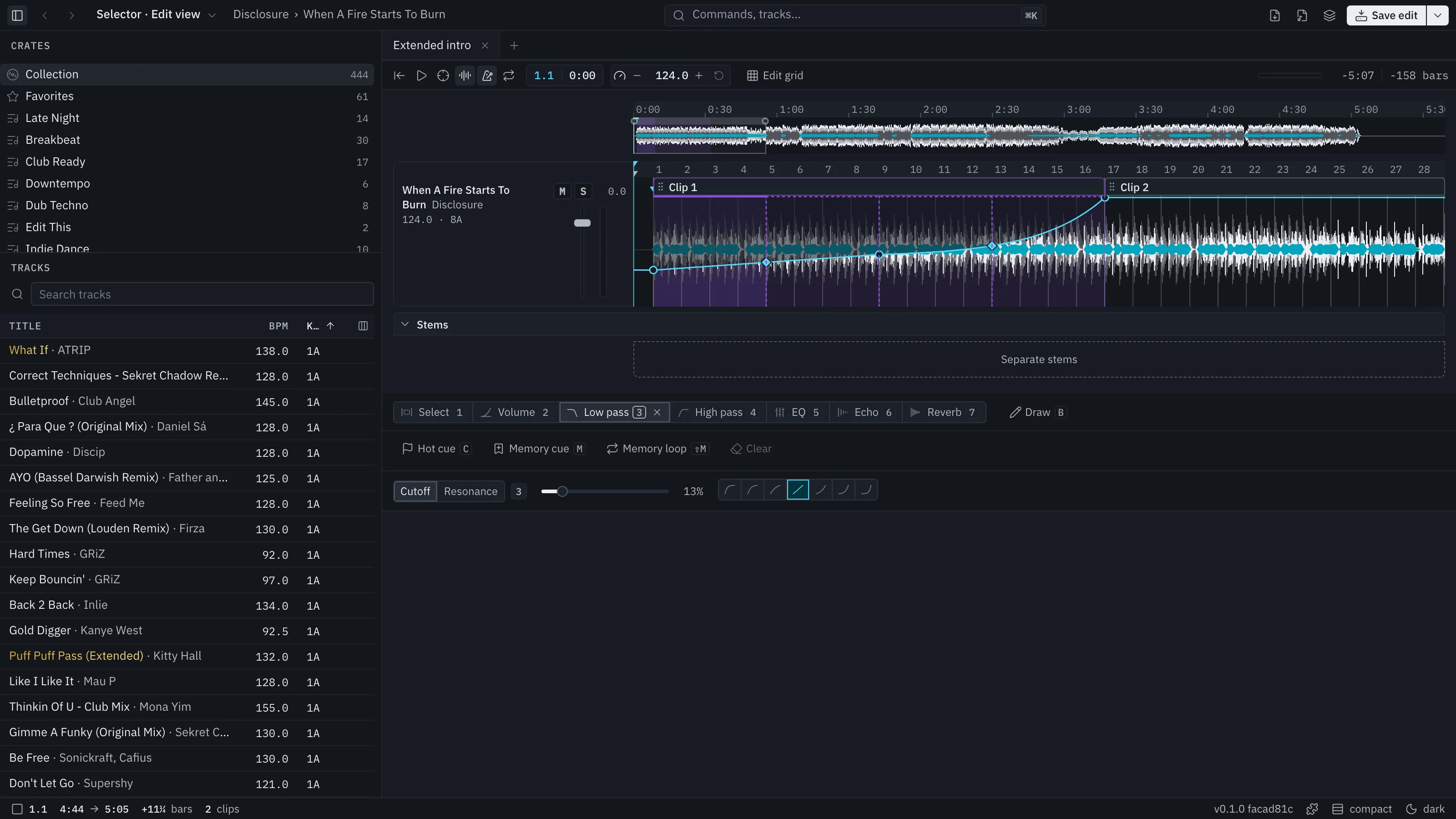
Under the waveform, a row of operations picks what you draw. Press the number key to choose.
| Key | Operation |
|---|---|
| 1 | Select (the default) |
| 2 | Volume |
| 3 | Low pass |
| 4 | High pass |
| 5 | EQ |
| 6 | Echo |
| 7 | Reverb |
| B | Draw |
Make a curve
Section titled “Make a curve”A curve is points on the beat grid joined by lines.
- Choose an operation, for example Low pass (3).
- Click the curve’s line to add a point. Drag a point to move it.
- Double-click a point to remove it, every time, wherever it is.
You can also drag across the last four bars first: the curve gets a point on each edge of the selection, flat at its current level. Then pull the right point down for a fade.
Other ways to shape it:
- Bend. A segment between two heights has a diamond at its middle. Drag it to bend the segment. It snaps between seven shapes, from strongly logarithmic through linear to strongly exponential.
- Move a stretch. Drag the line between two points up or down to move both points together, a flat stretch included.
- Jumps. Put two points on the same moment for an instant jump.
- Erase by dragging. A dragged point erases the points it passes over, and they come back if you return before you release.
- Levels. Heights snap to levels that mean something and the level shows beside the pointer: volume in dB (0, -3, -6, -9, -12, -18, -24 and silence), EQ in 3 dB steps, filters in octaves, echo and reverb in tenths. Hold Alt to move freely.
Draw (B) is a pencil. Drag across the waveform and it paints the chosen curve as flat steps, each one visible grid division wide at the height of the pointer. A stroke is one undo step. Choose Select, or pick another track, to turn it off.
What each operation does
Section titled “What each operation does”- Volume: the track’s level.
- Low pass and High pass: filters. Their settings row has Resonance, 0 to 100%.
- EQ: low, mid and high, one band at a time; the others show faint in their own colours. Press 5 again to move to the next band.
- Echo: a time from 1/4 to 2 beats, and Feedback. The echo rings on after its send closes and the tail is drawn where it rings.
- Reverb: a plate reverb with a Size slider, and a tail drawn the same way.
The settings row sits under the operations. For Low pass, High pass, Echo and Reverb, a setting such as Resonance can be drawn as its own curve: pick Cutoff or Resonance, Send or Feedback, Send or Size in the row, or press the operation’s number again. While a setting has no curve, its slider sets it.
Hear it as you draw
Section titled “Hear it as you draw”Curves play as you move them. There is no render step. Zooming and scrolling do not crackle.
Curves work the same on the Edit view’s main track, its laid-in lanes and the set planner’s decks.