
Browse and play
Crates (⌥1) is where Selector Studio opens. Use it to listen and decide. Placing cues and fixing beat grids happen in the Edit view, never here.
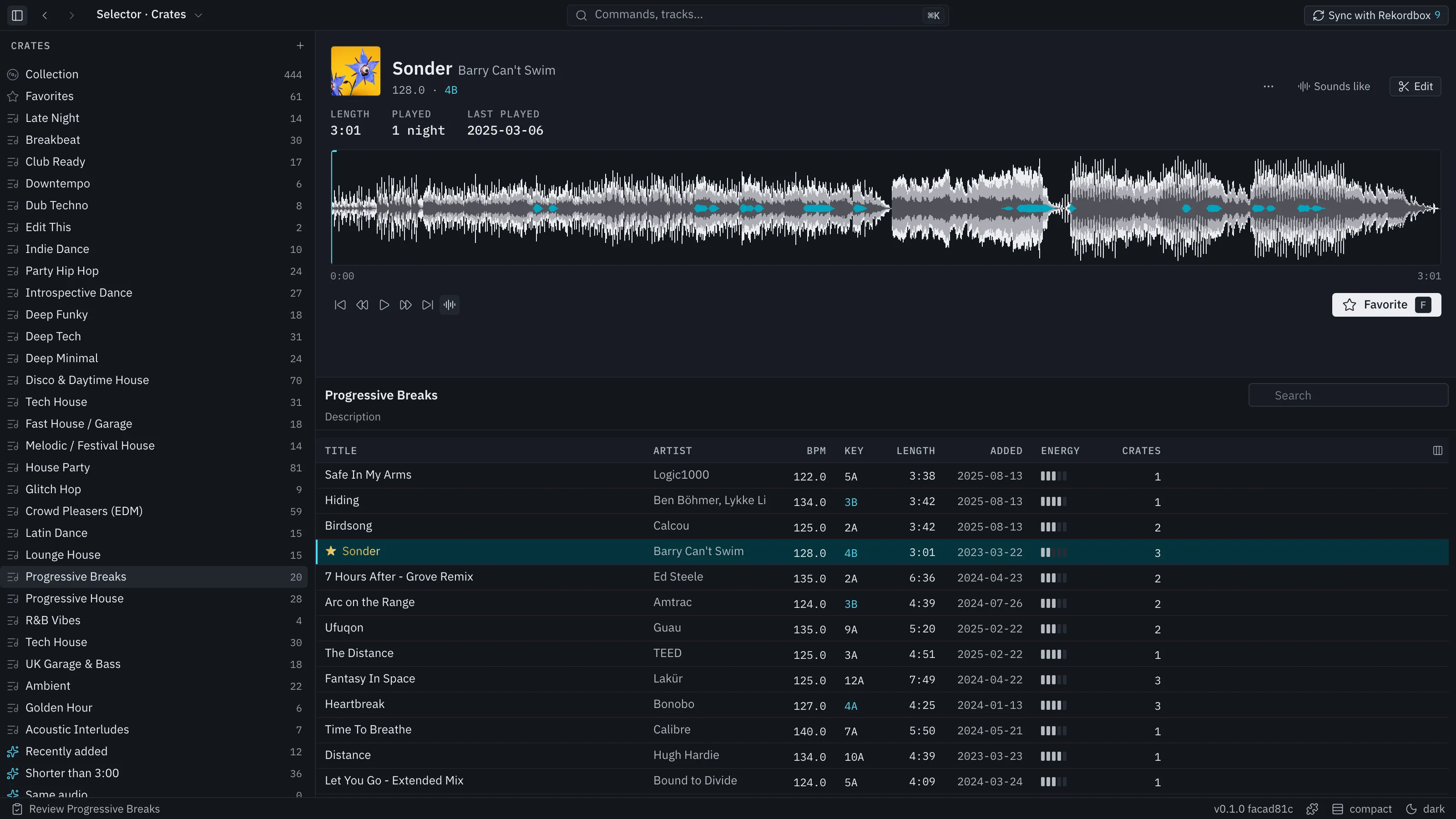
The tree
Section titled “The tree”The tree on the left lists:
- Collection: every track in the library.
- Favorites: always first. It cannot be renamed, moved or deleted.
- Your folders, crates and smart crates, in the order you set.
- Cut: tracks you cut in a review.
- Past reviews: each finished review with its kept and cut tracks.
- Any USB stick that is plugged in and holds a DJ library, read only, at the bottom.
Every crate shows its track count. Pending changes for Rekordbox show only as a count on the Sync with Rekordbox button.
Make a crate with ⌘N, a folder with ⇧⌘N and a smart crate with ⌥⌘N, or right-click the tree. Rename a crate in place. Drag crates to reorder them or into a folder. With focus in the tree, ⌫ deletes the crate and ⌘Z brings it back.
The track list
Section titled “The track list”Columns can be shown, hidden and reordered from the column menu, and sorted by clicking a header. A chip above the list shows the sort in force; its × goes back to the crate’s own order. The Key column is always on. A key in blue mixes with the master track.
Hover a key to see where it came from, for example “Source: Mixed In Key”. A playlist count shows its playlists on hover.
Pick rows with ↑ and ↓, ⇧-click for a range and ⌘-click to add one. ⌘A picks every row on show. Then:
- Drag rows to another crate to add them. A toast counts what was added and what was already there.
- Reorder within a crate by dragging, or ⌥↑ and ⌥↓. While the list is sorted by a column, clear the sort first.
- ⌘C copies the picked rows and ⌘V pastes them into the open crate after the selected row.
- ⌫ removes the picked rows from the crate. The track stays in the library.
- F marks a favourite. ↵ opens the track in the Edit view.
- ⌘F searches the list. Esc clears the search; a second Esc returns to the rows.
Right-click a row, the list’s header, the empty area or a crate for a menu of the same actions. A favourite’s title shows in gold when it appears in a crate other than Favorites.
The deck
Section titled “The deck”The deck above the list plays the selected track. It shows the waveform, the key and tempo, and buttons for play, favourite and Edit. Space plays and stops. If you turn on Start tracks at the drop in Settings, the deck starts a track at its drop instead of the beginning.
The deck carries no beat-grid lines and no cue editing. Keep, Cut and Extended appear on the deck only while a review is open.
If a file has moved, the deck says so and offers Locate… to point at the new place, beside Try again.